
Understanding Image Sharing and Update Timing on SMARTWIZ+ art
SMARTWIZ+ art supports flexible image sharing and updating, designed to work seamlessly across different network and power conditions.
Because the device is optimized for both instant updates and long battery life, image delivery behavior may vary depending on how and when images are sent.
This article explains how image sharing works, why you may see different confirmation messages, and when images are updated on the frame.
How Image Delivery Works
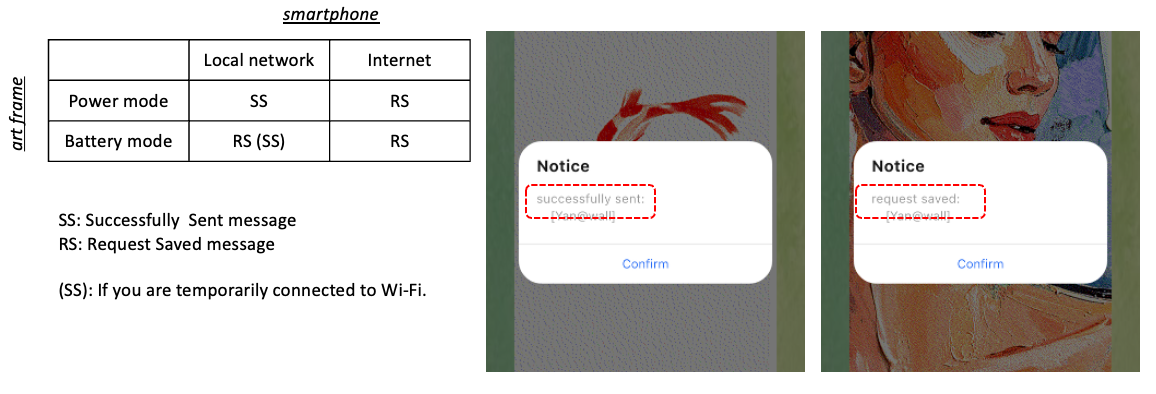
SMARTWIZ+ art uses two image delivery methods, depending on the network connection of your phone and the power state of the frame.
1. Local (Direct) Image Delivery
Images are delivered instantly when all of the following conditions are met:
-
Your smartphone is connected to the same local Wi-Fi network (LAN) as the frame
-
The frame is powered by AC and is fully online
In this case, images are sent directly from the phone to the frame without using the cloud.
App confirmation message:
“Successfully sent”
The image should appear on the frame almost immediately.
2. Cloud-Based Image Delivery
Images are delivered via the cloud when:
-
Your smartphone is not connected to the same local network as the frame, or
-
The frame is running on battery power and is currently in sleep mode
In this case, the image is first uploaded to the cloud and then delivered to the frame the next time it connects to Wi-Fi.
App confirmation message:
“Request saved”
This message means the image was successfully queued and will be delivered later.
Battery Operation and Update Timing
To maximize battery life, SMARTWIZ+ art uses a smart power-saving design when running on battery:
-
The frame wakes up once per hour
-
It stays connected to Wi-Fi for approximately 1 minute and 40 seconds
-
During this time, it checks the cloud for new images or messages and updates the display if needed
-
Outside of this window, the frame remains in sleep mode
Because of this behavior, cloud-sent images may not appear immediately when the frame is on battery power. This is expected and helps ensure long battery life.
When Images Update Immediately (Exceptions)
Even while running on battery power, images may update immediately if:
-
You press the physical button on the frame to force a temporary Wi-Fi connection, or
-
A local image transfer occurs during the scheduled hourly wake-up window
In these cases, the app may show “Successfully sent”, and the image will appear right away.
Do the Phone and Frame Need to Be on the Same Network?
No.
Images can always be sent through the cloud, even when your phone and the frame are on different networks.
However, being on the same local network allows for instant image delivery, while cloud delivery may involve a short delay depending on the frame’s power state.
Summary
-
“Successfully sent” means the image was delivered immediately via a local connection
-
“Request saved” means the image was queued in the cloud and will be delivered when the frame reconnects to Wi-Fi
-
Delayed updates during battery operation are expected and help preserve battery life
Understanding these states helps explain why images may sometimes appear instantly and other times after a short delay.